<Home>
APPLICATIONS / INFRASTRUCTURE
OPEN SOURCE. YOUR INFRASTRUCTURE.CLOUD / IN DEVELOPMENT
A HOME FOR WHAT YOU BUILD

Your apps.
Your infrastructure.
One place to run them.

Deploy from Git. Connect private services. Understand what changed. Hakopod brings your applications and everyday operations into one place.

Open-source core. Self-host on your own Linux servers.

START HERE /curl -fsSL https://hakopod.com/scripts/installer.sh | sudo sh
PRODUCT FILM / HAKOPOD01:08

Watch Hakopod in action.

See how Hakopod brings deployments, private services and everyday operations together.

Product film · Local demo footage · English captions included

Read film description

Watch Hakopod in action.

Deploy and manage
your applications.

Your next feature needs your attention. The way you run it should be easier to understand.

Concept illustration / source, services and operations

Keep deployments and
operations together.

The same essential jobs. A shared context for the code, configuration and services behind them.

SEPARATE TASKS / CONTEXT LIVES BETWEEN TOOLS
01 Git repository
02 Build output
03 Service settings
04 Runtime logs

Find the source. Find the settings. Find the release. Put the story together.

WITH HAKOPOD / ONE APPLICATION CONTEXT
01 Source
02 Configuration
03 Deployment
04 Operations

Follow the application from its code to the services running it.

Deploy. Connect. Monitor.

Your applications are connected.
Your tools should see the whole picture.

Deploy from Git or a container image.

Bring a Git repository or a compatible container image. Review configuration, deploy, and keep the release history close to the application.

Explore deploy

Connect services over private networks.

Connect your API, workers and databases over private service networking. Add a domain to the services that need public HTTP access.

Explore connect

Inspect logs and deployment history.

Inspect runtime state, logs and deployment history from the dashboard or your MCP client. Give your agent application context and choose whether it can deploy.

Explore operate

REVIEWABLE BY DESIGNConfiguration lives with your work.

YOURS TO OPERATEYour infrastructure. Your choices.

Run GitHub Actions.
Manage your databases.

Run CI jobs and manage application data with controls for the work each one needs.

01 / MANAGED ACTIONSLIVE BETA
CONCEPT PREVIEW / WORKFLOW TO JOB LOGS

Run and inspect GitHub Actions jobs.

Run organization or repository workflows on AMD64 or ARM64 runner pools, with one job per runner and resource controls. Follow each step and search job logs.

Explore Managed Actions

Cloud eligibility and capacity apply. Available with self-hosted Pro.

02 / MANAGED DATABASESDEVELOPMENT RELEASE
CONCEPT PREVIEW / POSTGRESQL + REDIS CONNECTIONS

Choose the database for your app.

Choose PostgreSQL, Redis, MySQL or MongoDB, with private connections and a separate copy for recovery. Inspect the restored data before switching your application's connection.

Explore Managed Databases

Self-hosted alpha.50. Cloud requires the matching operator setup and approved workspace capacity. The illustration shows an example topology.

Deploy an application
in four steps.

A repeatable path, with room to inspect each step.

SOURCE / GIT OR IMAGE

Bring your code

Connect your Git repository, or start with a compatible container image.

Read the guide
CONFIGURATION / TOML

Review configuration

Keep services, variables, storage and networking in reviewable configuration.

Read the guide
DEPLOYMENT / RELEASE

Deploy your services

Review the release and follow each service as it rolls out.

Read the guide
OPERATIONS / OBSERVE

Follow the release

Inspect current health and logs. Keep deployment history in context.

Read the guide

Install Hakopod
on your Linux server.

Start on a fresh Linux server. Review the installation guide, then bring your first application.

SETUP / YOUR FIRST APPLICATION
01 / BEFORE YOU INSTALL

A fresh Linux server.

Review the supported operating system, server access and resource requirements before installation.

Read the prerequisites ↗
02 / INSTALL HAKOPOD$ curl -fsSL https://hakopod.com/scripts/installer.sh | sudo sh
03 / YOUR FIRST RELEASE

Bring your application.

Connect your source, review service configuration and deploy. Follow the first-application guide for the complete steps.

Open the first-application guide ↗
Review the script before you run it.View source ↗

Read the setup guides.

All documentation ↗

Inspect the actual
Hakopod dashboard.

Real dashboard captures from our local shop demo. Explore services, configuration and release history.

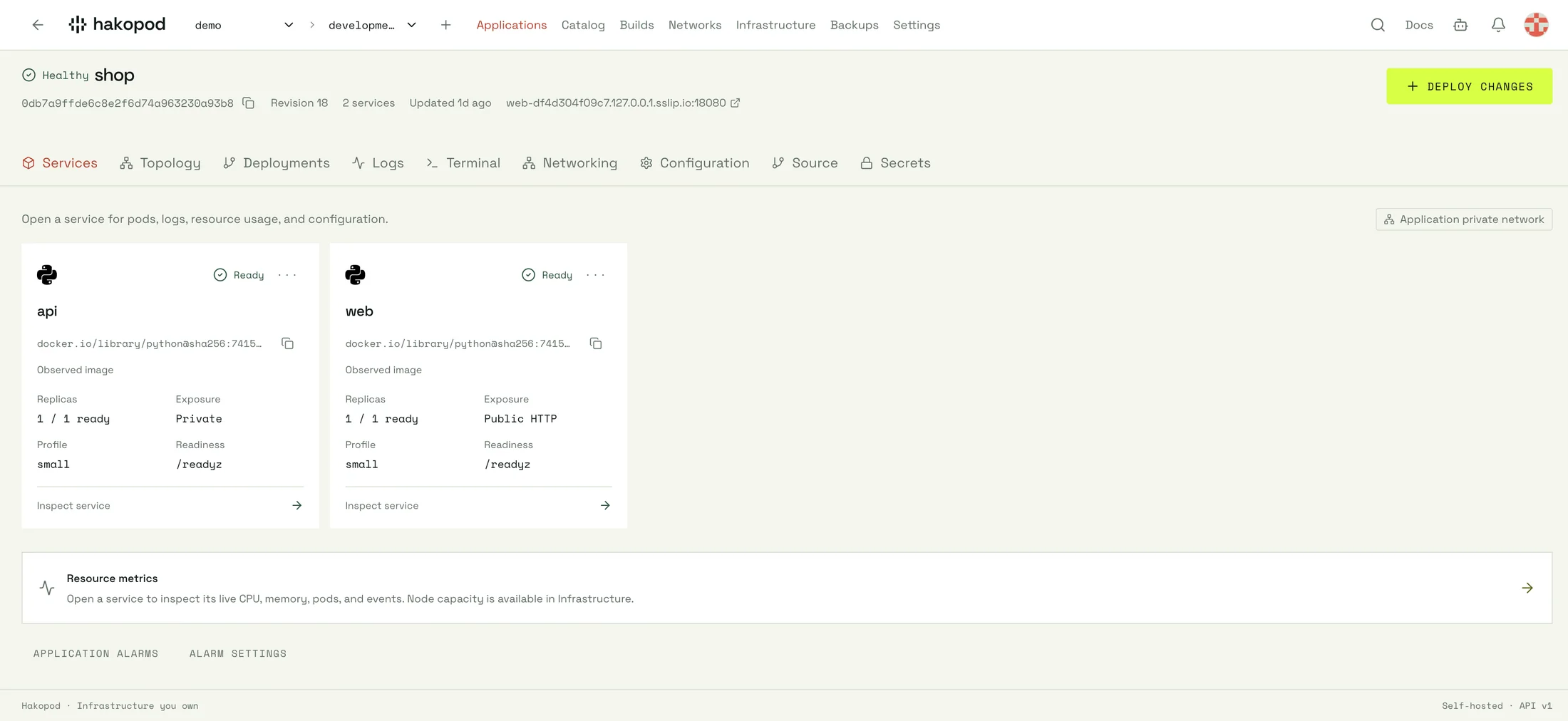
Hakopod services dashboard from the shop local demo
LOCAL DEMO / SERVICES

The shop application with web and API services. Local demo workloads, revision 18.

Select the image to inspect the full capture. ↗
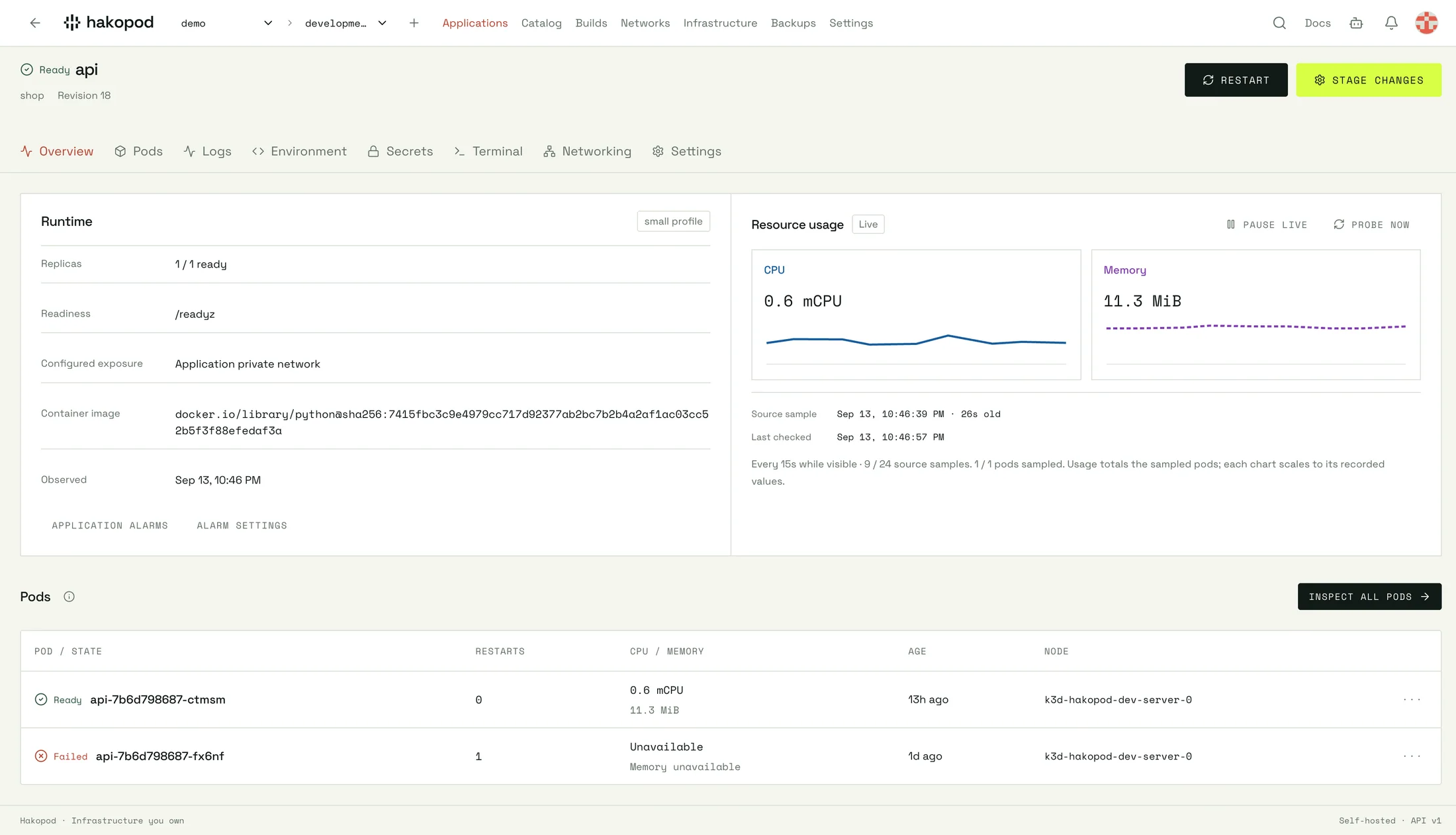
Hakopod inspect dashboard from the shop local demo
LOCAL DEMO / INSPECT

An actual service probe, current pod and historical failed pod. Sample readings describe this local demo only.

Select the image to inspect the full capture. ↗
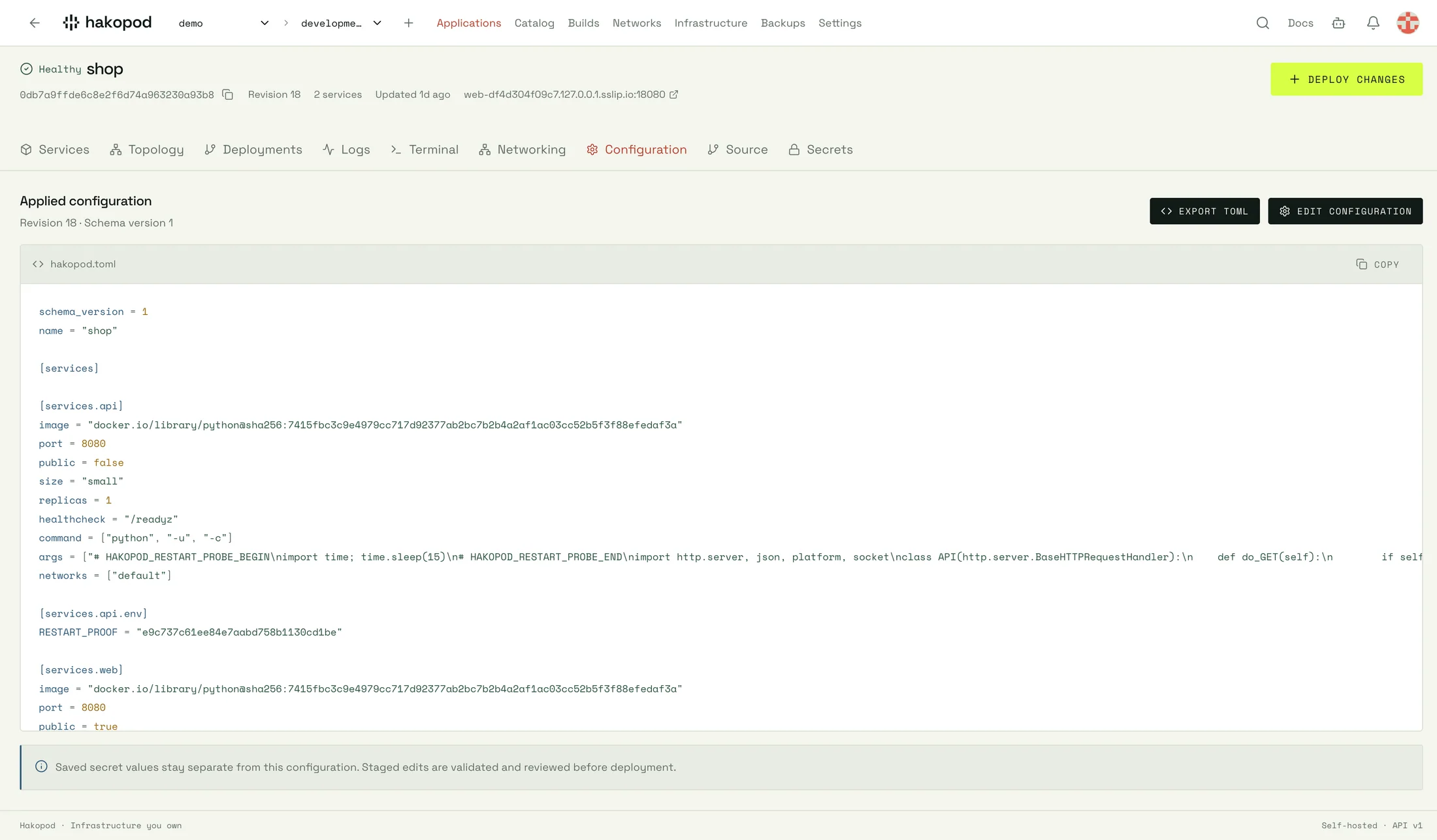
Hakopod configure dashboard from the shop local demo
LOCAL DEMO / CONFIGURE

Applied TOML for the shop application. Reviewable configuration alongside deployment history.

Select the image to inspect the full capture. ↗
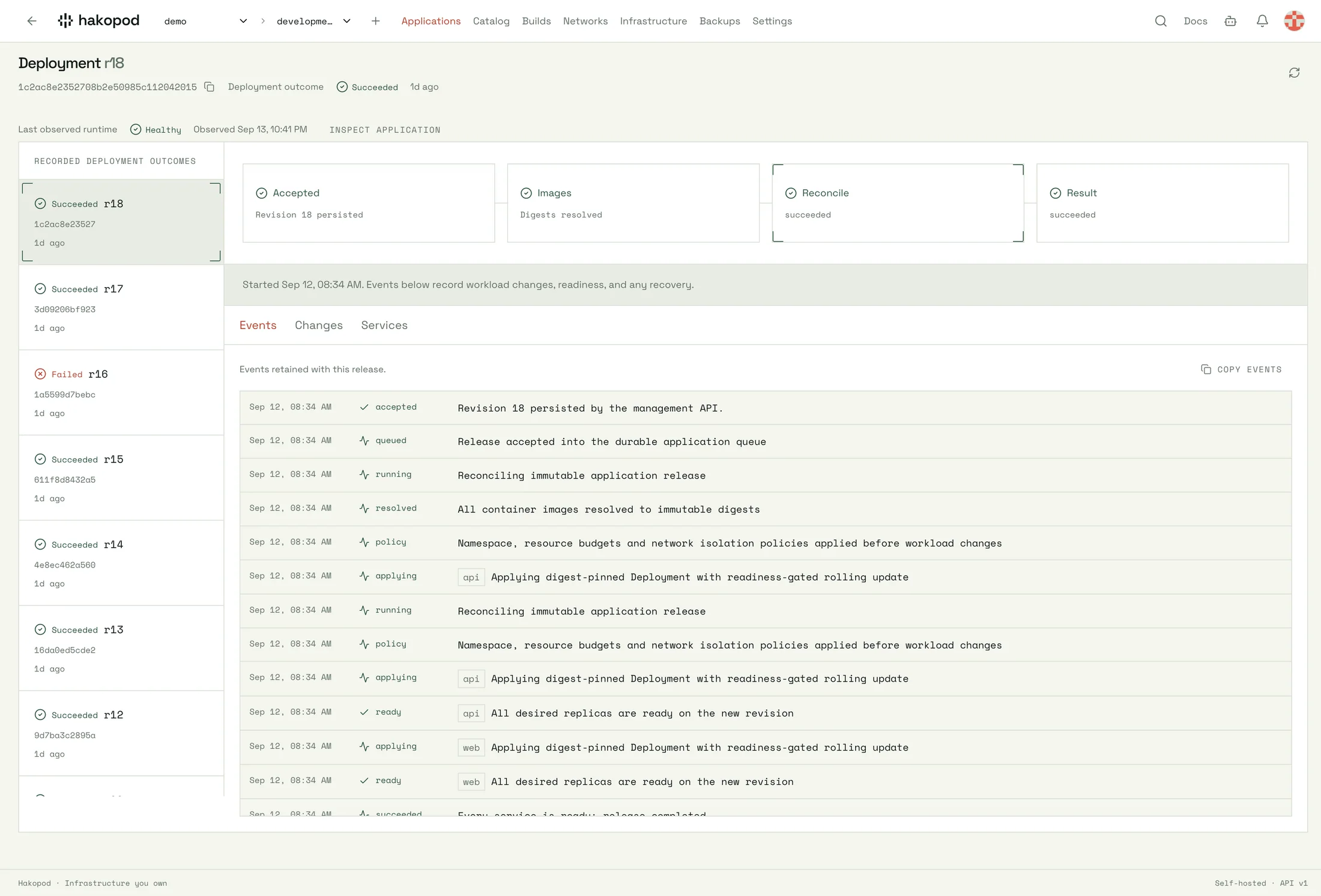
Hakopod deploy dashboard from the shop local demo
LOCAL DEMO / DEPLOY

A recorded shop deployment from 12 September. Historical rollout details are separate from current service health.

Select the image to inspect the full capture. ↗

Compare self-hosted
and Cloud options.

Run the open-source core yourself. Add Pro when you need actor audit history. Follow Cloud as it develops.

SELF-HOSTED / CORE

Free

$0/ license

Your applications on infrastructure you operate.

Install Hakopod
  • Open-source deployment engine
  • Teams and invitations
  • Fixed project roles
  • Your own infrastructure costs
CLOUD / IN DEVELOPMENT

Managed Cloud dashboard.

In development

A hosted dashboard for connected compute. See current onboarding details.

Explore Cloud
  • Git and HTTP/HTTPS
  • Domains
  • Private service networking
  • Paid checkout is not open yet

Prices come from our current published plans. Compare features and terms ↗

Read the source
and release history.

Read the source. Follow releases. Understand the decisions behind your platform.

Learn about deployment
and operations.

All field notes ↗
11 / QUESTIONS

Common questions
about Hakopod.

Read the documentation ↗
01 Where does Hakopod run?

Install the open-source platform on your own Linux infrastructure. You operate the cluster, storage, upgrades and recovery. Start with the installation guide to review those responsibilities.

02 Can I bring Git repositories and container images?

Yes. Deploy from Git or use a compatible container image. Images need to support the non-root runtime. Review service configuration, secrets and persistent storage before deployment.

03 Is Hakopod Cloud available?

Cloud is in development. Shared Cloud is designed for Git, HTTP/HTTPS, domains and private service networking. Public TCP remains a self-hosted operator decision. See the Cloud page for current onboarding information.

04 What is Free, and what is paid?

Basic self-hosted teams, invitations and fixed project roles are Free. Self-hosted Pro adds actor audit history. Custom roles and organization MFA enforcement remain planned.

05 Does a rollback restore my database?

No. A deployment rollback and a data restore are different operations. Back up persistent data separately, rehearse restoration, and review schema compatibility before rolling back an application.

BUILD SOMETHING THAT’S YOURS.

Deploy your apps
with Hakopod.