A pool for your team.
Create an organization pool or dedicate runners to one repository. Keep repository access under your GitHub runner-group policy.
Give your workflows a runner pool. Choose the resources, keep each job isolated, and follow the work from its first step to its final log.
Watch a GitHub Actions workflow move through a runner, its steps and job logs.
Live beta · Illustrative UI · Music and on-screen text
Read film descriptionEach job stays connected to its runner and workflow attempt.
Preparing the runner workspace.
Ready to run the job.$ echo 'Hello from my runner'
Hello from my runnerCreate an organization pool or dedicate runners to one repository. Keep repository access under your GitHub runner-group policy.
Each runner takes one job. Its workspace and Docker data are removed afterward, before a replacement starts.
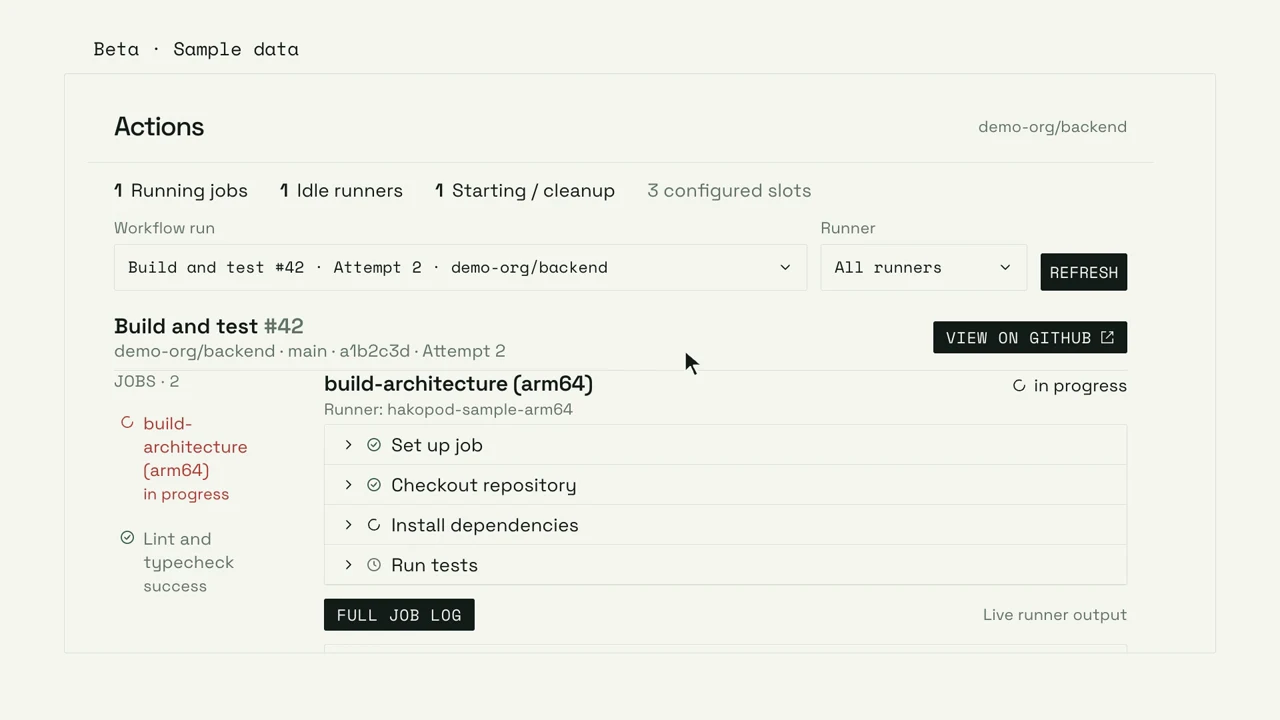
Follow workflow attempts, assigned runners, job steps and logs together. Inspect the current job or return to a completed run.
Your workflow stays in GitHub. Hakopod supplies the managed runners it asks for.
Open Catalog → Automation → Managed Actions. Choose a project, environment, and GitHub organization or repository.
Set labels, replicas, architecture and resources. Save a scoped GitHub credential during review; keep the token out of Git and TOML.
Deploy the pool, then use its configured label in runs-on. Open the service’s Actions tab to follow assigned jobs.
name: First runner job
on: workflow_dispatch
jobs:
  test:
    runs-on: [hakopod]
    steps:
- run: echo 'Hello from my runner'See observed running, idle and starting runners. Select a runner to find its assigned jobs, then move through workflow runs and attempts without losing the context.
Live output is bounded and best effort. Completed logs come from GitHub. Missing permissions, expired logs and truncation remain visible; queue status belongs in GitHub.
Pick AMD64 or ARM64, then set CPU and memory reservations separately from limits. Scheduling checks reserved capacity, so an idle pool still reserves its declared resources.
The replica count sets concurrent job slots. Draining jobs stay within that count until cleanup finishes.
Choose 2–16 GiB of workspace for source, tools, images and build files. Workspace and Docker data are deleted after every job.
Each job uses gVisor and its own Docker daemon. No host Docker socket, host directory or Kubernetes credential is mounted.
Runner resources include Docker and sandbox overhead. A memory limit of at least 4 GiB is required. Review the guide for reservations, disk requirements and operator prerequisites.
Managed Actions is live in beta. Cloud use requires trusted team eligibility and an eligible sandbox node. Self-hosted use requires Pro and operator setup. Creating a Cloud account alone does not enable a runner pool.
Each replica is one concurrent job slot. You choose the replica count and resources per runner. Busy runners that are draining still count against the pool limit; capacity depends on the installation and Cloud allowances.
Yes. Each runner has its own Docker daemon inside the gVisor sandbox. Docker actions, job containers, service containers and builds use that daemon. There is no host Docker socket. Devices, kernel modules and nested virtual machines are unavailable.
Configuration changes, scaling down and pausing drain busy jobs before removing their runners. Deleting the service cancels running jobs. Keep its GitHub credential available until registration cleanup finishes.
Live output is a bounded, best-effort view. Completed logs come from GitHub; permissions, retention and availability still apply. The interface shows missing or truncated output. Use GitHub for queue status and complete retained logs.
No. Managed Actions provides GitHub Actions runners. Configuring a pool does not change the build provider used to deploy your Hakopod applications.
Managed Actions is live in beta. Cloud requires eligibility and sandbox capacity; self-hosted installations require Pro and operator setup.